

The KI6CR-LABS CEC Adapter was designed and tested specifically to work with the CEC firmware for the Quansheng UV-K5 and compatible radios. This page explains the schematic choices and what to do if you are using a different firmware.
Schematic: Research vs Reality
You may find various CEC adapter schematics online, including on the CEC firmware project website. Despite these variations, the KI6CR-LABS adapter uses the following resistor values intentionally:
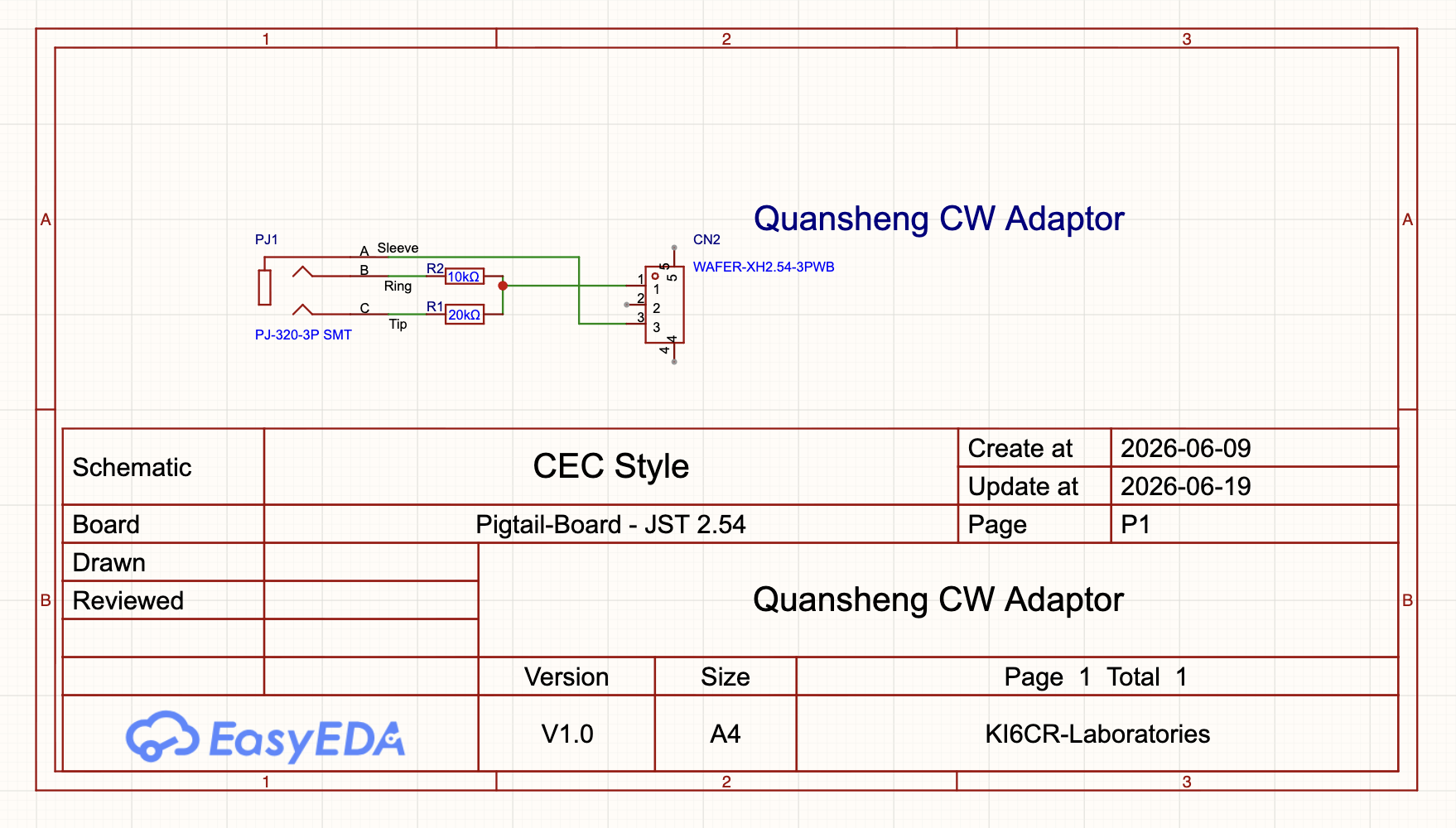
- DIT line: 20kΩ resistor
- DAH line: 10kΩ resistor
This wiring produces correct DIT and DAH operation with the CEC firmware despite the schematic indicating otherwise. I’m not sure why the schematics say one thing and the firmware reacts differently. The CEC firmware itself has no built-in option to swap or reverse DIT and DAH at the software level, so the adapter schematic matches what works with that firmware.
Using the NR7Y Firmware?
A recent update to the NR7Y firmware (by Brian NR7Y) changed the internal DIT/DAH mapping to match the resistor layout shown in published CEC schematics. This was implemented as a bug fix, but it has a side effect: adapters that were built to work correctly with the original CEC firmware now have their DIT and DAH reversed when used with the updated NR7Y firmware.
The good news: Brian NR7Y is a thoughtful developer and included a setting in his software to address exactly this situation. When configuring your cable type in the NR7Y firmware, you will see two options:
- CEC Cable
- CEC Cable (Reversed)
If you are using the KI6CR-LABS adapter with NR7Y firmware v1.1 or later, choose “CEC Cable (Reversed).” This corrects for the updated mapping and restores proper DIT/DAH operation.
Why I Did Not Change the Adapter Design
I considered redesigning the adapter to match the resistor layout shown in the CEC project schematics. However, doing so would reverse DIT and DAH for users running CEC 0.3 firmware, and that firmware has no software setting to compensate. Changing the hardware would adapt for NR7Y users while breaking CEC 0.3 users, and there would be no way for those CEC users to recover short of physically modifying the cable.
By keeping the design matched to the CEC firmware behavior, users with NR7Y have a simple software setting to fix it. That is the better tradeoff.
Summary
| Firmware | Adapter Setting |
|---|---|
| CEC 0.3 | No setting needed, works as-is |
| NR7Y v1.01 | Set cable type to CEC Cable |
| NR7Y v1.1 and later | Set cable type to CEC Cable (Reversed) |
If you have questions, please visit our Contact page.